Agent control systems
Loop Engineering for AI Coding Agents
Loop engineering is the practice of giving an AI coding agent a trigger, goal, execution mode, verifier, review gate, state log, and stop rule.
On this page
- Define the loop before you run the agent
- Choose the trigger by the kind of work
- Separate verifiable gates from LLM judgment
- Use nested loops to build a product from scratch
- Run backlog loops like a repair shop
- Start production-error loops read-only
- Use manager loops to remove status fog
- Pick the smallest orchestration layer that controls the risk
- Build your own loop
- Watch for these failure modes
- Read the implementation guides
Loop engineering turns an AI coding agent from a chat partner into a repeatable worker with a trigger, goal, execution mode, verifier, review gate, state log, and stop rule.
Most weak agent workflows fail in the same place: the first prompt sounds clear, but the second and third pass have no control system. The agent edits before reproducing, weakens the test to make the suite green, opens a bigger scope than the ticket asked for, or keeps polishing because nobody defined the stop condition.
The useful unit is not the prompt. The useful unit is the loop.
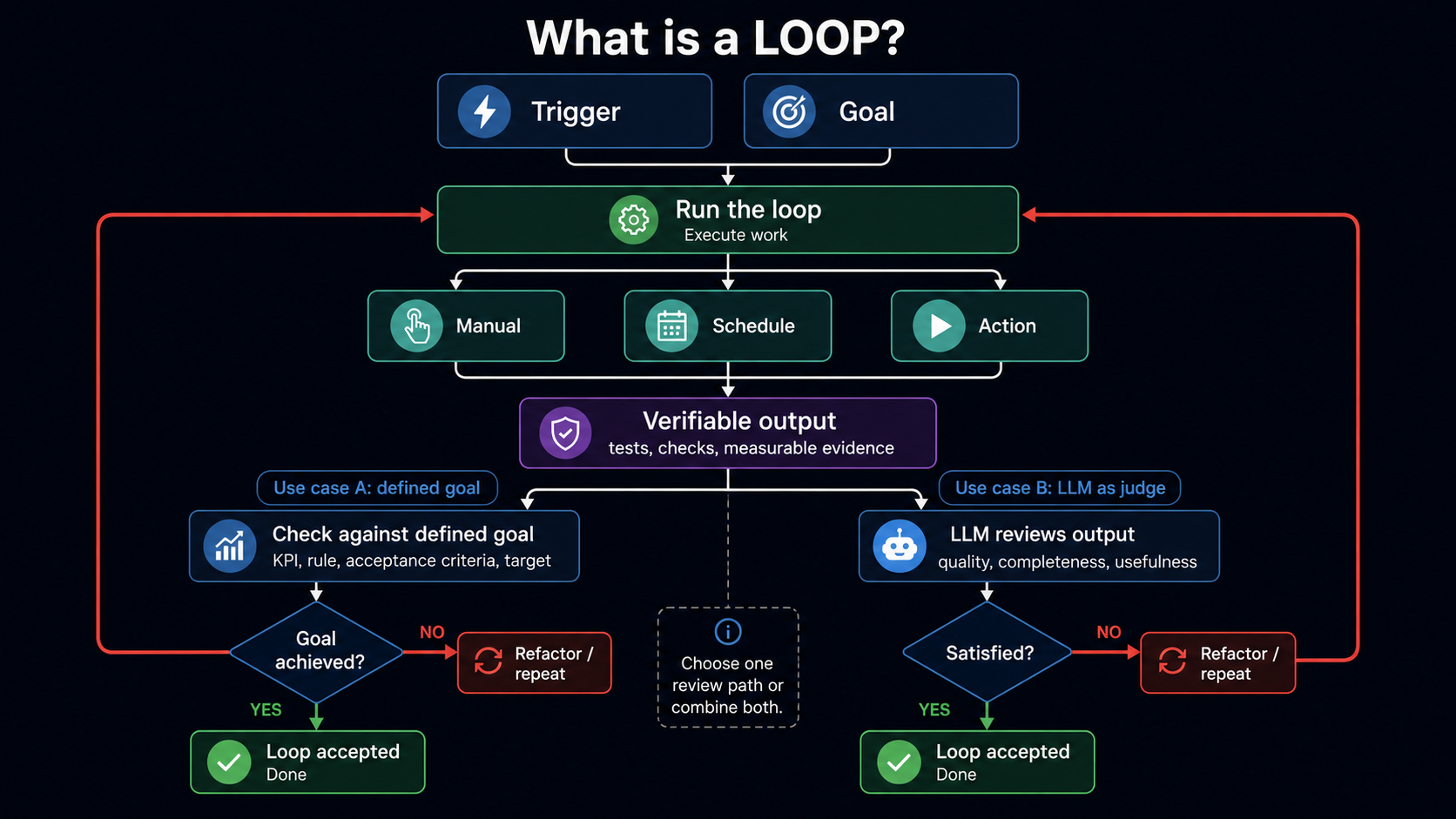
Define the loop before you run the agent
A loop is a repeatable workflow that starts from a clear trigger and goal, performs work through one or more execution modes, verifies the result, and repeats or refactors until the result is accepted.
That sounds simple, but each word does work.
| Loop part | Question it answers | Engineering example |
|---|---|---|
| Trigger | What starts the loop? | Manual request, scheduled sweep, failed test, new ticket, PR event, production alert. |
| Goal | What must be true when the loop stops? | "The duplicate invite request returns a visible error and has a regression test." |
| Execution mode | How does the loop run? | Manual /goal, nightly automation, hook on CI failure, subagent review, scripted workflow. |
| Verifier | What proves progress outside the agent's summary? | Tests, lint, build, CI, coverage, browser screenshot, log query, eval score, acceptance checklist. |
| Judge | Who decides whether the verifier is enough? | Deterministic gate first, then a fresh model review or human review for judgment-heavy work. |
| State | What survives the turn? | Progress file, PR comment, Linear issue update, CI artifact, benchmark result, run log. |
| Stop rule | When does the loop stop or escalate? | Success, blocker, max attempts, budget limit, approval needed, repeated failure, unsafe scope change. |
The verifier matters most. If the loop can only say "the agent thinks it is done," the loop is not useful yet.
Choose the trigger by the kind of work
Bad loops often start from the wrong trigger. A goal-driven loop and a scheduled loop are different tools.
| Trigger type | Use it for | Example |
|---|---|---|
| Manual | A human knows the task is worth doing now. | "Fix issue #418. Reproduce first. Stop when the regression test passes." |
| Scheduled | The work should happen on a cadence. | "Every weekday at 9:00, scan aging PRs and produce owner actions." |
| Action-based | External state should start the loop. | "When CI fails on main, inspect the failing job and propose the smallest safe fix." |
Manual loops are best for product slices, refactors, and bugs where the human still owns priority. Scheduled loops are best for sweeps: docs drift, aging pull requests, stale incidents, dependency reviews, release baselines. Action-based loops are best when the signal is already in the system: failed CI, a Sentry spike, a ticket status change, a PR review, or a deploy event.
The trigger should not decide the whole task. It should open the loop with enough context to run the next safe step.
Separate verifiable gates from LLM judgment
There are two kinds of finish lines.
The first is deterministic: test coverage reaches 100%, a benchmark is below 50 ms, CI is green, a migration runs, a log query shows the error family has a regression test. These are strong loop targets because the agent cannot argue with the check.
The second is judgment-based: "docs are complete," "architecture is simpler," "the UI matches the design," "the release brief is useful." These can still be looped, but the judge must be constrained. Give the large language model (LLM) a rubric, examples, out-of-scope rules, and a maximum number of passes. When the work affects product taste, architecture, security, pricing, customer data, or deployment risk, keep a human gate.
The behavior should be explicit:
- Start from the trigger.
- Compare the current state to the goal.
- Execute the smallest useful pass.
- Verify the output.
- Send the result through the judge.
- Stop and report evidence if the judge accepts the result.
- Refactor the smallest failing part and run the loop again if the judge rejects the result.
- Stop with evidence, attempts, and the next decision needed if the loop is blocked.
This is why "refactor until satisfied" is weak by itself. It can work only when "satisfied" is backed by rules: public API unchanged, tests pass, no new dependency, no file outside the target module, review finds no P0/P1 issue, max three passes.
Use nested loops to build a product from scratch
Do not ask an agent to "build the whole product." That gives the loop no stable goal. Use an outer product loop to choose the next slice, then inner loops to build and verify that slice.
The first slice must be small enough to prove:
A private-beta user can request an invite, see the saved pending state,
and see a clear duplicate-request error.
Now the loops have real jobs.
| Loop | Input | Output | Gate |
|---|---|---|---|
| Product discovery | notes, user problem, constraints, competitor examples | one-page brief and non-goals | first user path is named |
| Requirements | brief, user path, risk list | acceptance criteria and out-of-scope list | every requirement is testable |
| Architecture | requirements, repo map, data model | slice plan and file boundaries | files in scope/out of scope are explicit |
| Implementation | slice plan, repo rules, state file | working feature branch | tests, lint, build, browser check |
| Review | diff, goal, evidence log | findings or approval | fresh reviewer finds no P0/P1 issue |
| Release | diff, docs, alert query, rollback note | release checklist | owner accepts risk and post-deploy check |
The product loop is not one giant run. It is a queue of small loops. Each loop produces evidence that the next loop can read.
/goal Ship the private-beta invite request slice.

Trigger:
- Manual product request approved for this sprint.

Goal:
- A visitor can submit an invite request.
- Duplicate requests show a clear existing-request state.
- The route has a regression test.

Read first:
- AGENTS.md
- docs/product/private-beta.md
- app/invite/**
- lib/db/**
- current diff

Scope:
- Allowed: invite page, invite API, invite tests, seed fixture.
- Forbidden: auth rewrite, billing, email deliverability, admin dashboard.

Verifier:
- npm test
- npm run lint
- npm run build
- browser check for happy path and duplicate-request state

State:
- Update docs/agent-runs/private-beta-invite-loop.md after each pass.

Stop when:
- The verifier passes.
- The browser check proves both states.
- A fresh review finds no P0/P1 issue.

Escalate when:
- The task requires production email, account roles, payment logic, or schema deletion.
- The same failure repeats twice.Run backlog loops like a repair shop
Backlog loops are valuable because they turn stale issues into one of four outcomes: reproduced and fixed, reproduced and assigned, duplicate, or blocked with evidence.
Do not let the agent browse a backlog and "clean it up." Give it a batch rule and a closure rule.
Goal:
Reduce the P0/P1 backlog by handling the top reproducible issues.

Trigger:
- Scheduled daily sweep, or manual run before planning.

Batch rule:
- Sort by severity, customer impact, age, linked production signal, and owner.
- Pick one issue at a time.

Execution:
1. Read the issue, linked PRs, logs, and related files.
2. Reproduce with a failing test, script, log query, or explicit non-repro note.
3. Patch only the root cause.
4. Add or update the regression check.
5. Run the verifier.
6. Update the issue with changed files, commands, output, remaining risk, and owner.

Verifier:
- Original reproduction fails before the fix.
- Regression check passes after the fix.
- Relevant test/lint/build command passes.

Do not:
- Close from a summary alone.
- Delete or weaken tests.
- Silence logs.
- Broaden catch blocks.
- Combine unrelated refactors with the patch.

Stop when:
- The batch is handled, or the next issue requires missing credentials, unclear product decision, or high-risk owner approval.
The repair loop should leave a reviewer with less work, not more prose. The issue update should name the cause, the evidence, and what still needs a human.
Start production-error loops read-only
Production loops should not begin by editing code. They should begin by finding the error family and proving that it is actionable.
The safe shape is:
Read-only pass:
- Query the top error families by count, severity, customer impact, and first-seen time.
- Link each family to deploy history, likely owner, code path, and reproduction path.
- Pick one actionable family.
- Stop if the signal points to infrastructure, missing credentials, third-party outage, or unclear ownership.

Write pass:
- Patch only the root cause for the selected family.
- Add a regression check.
- Run the verifier.
- Prepare deploy note with risk, rollback condition, and post-deploy query.
A production-error loop should never reward hiding the signal. "No more errors" is not enough if the fix was to suppress logging or catch everything.
Use this gate:
| Gate | Passes when | Fails when |
|---|---|---|
| Error family | One dominant family is named with count and path | Agent lists unrelated stack traces |
| Root cause | Reproduction or code path explains the error | Patch is guessed from message text |
| Regression | A test or probe prevents recurrence | Only manual confidence exists |
| Signal integrity | Logging and alerting still expose failure | Logs are silenced or catches broaden |
| Release | Rollback and post-deploy check are named | Deployment risk is hidden in summary |
Use manager loops to remove status fog
Engineering managers should use loops for discovery and decision support, not only code changes. The best manager loop does not "summarize status." It finds missing proof.
| Manager loop | Trigger | Reads | Output |
|---|---|---|---|
| Aging PR sweep | every weekday morning | PR age, CI status, reviews, merge conflicts | owner, blocker, next action, escalation date |
| Promise-to-proof sweep | twice weekly | meeting notes, docs, issues, PRs | commitments without evidence or owner |
| Incident follow-up | after each incident | postmortem, action items, regression checks | stale tasks, missing owners, blocked follow-up |
| Docs drift | weekly or after release | changed code paths, nearest docs, runbooks | docs PR or explicit no-docs-needed note |
| Release-risk scan | before deploy | diff, migrations, flags, alerts, rollback note | go/no-go brief with named risks |
The manager loop should usually start read-only. It can open issues, draft Slack messages, or prepare PRs only if your permissions and review policy allow that.
The output format should be boring:
## Aging PR loop result

PR: #812
Owner: Maya
Age: 31 hours
Current blocker: required e2e check is failing
Evidence: CI job app-e2e failed at checkout duplicate-request path
Next action: assign repair loop to checkout owner
Escalate if: no movement by 15:00
That is useful because it changes the meeting. You stop asking "what is blocked?" and start deciding "who owns the next observable action?"
Pick the smallest orchestration layer that controls the risk
Loops get expensive when the control system is bigger than the task.
| Use | Choose | Avoid |
|---|---|---|
| One known edit | normal prompt | scheduled automation |
| One durable objective | /goal or equivalent goal mode | broad recurring sweep |
| Waiting for external state | /loop, schedule, routine, automation | manual "continue" prompting |
| Mandatory policy | hook or CI gate | asking the model to remember |
| Independent review | subagent or fresh reviewer | same agent self-approval |
| Parallel implementation | worktrees and separate branches | multiple agents in one checkout |
| Repeatable pipeline | scripted workflow or SDK orchestration | hand-managed chat threads |
The rule is simple: add a layer only when it controls a real failure mode. Worktrees control file collisions. Hooks control forgotten checks. Subagents control context pollution and self-review. Schedules control recurring discovery. A goal controls repeated execution against one finish line.
Build your own loop
Use the guide workbench instead of duplicating it here:
- Open the Codex loop workbench for
/goal, automations, AGENTS.md, skills, sandbox profiles, subagents, review gates, and unattended sweeps. - Open the Claude Code loop workbench for
/goal,/loop, routines, hooks, subagents, state files, worktrees, and production gates.
Watch for these failure modes
| Failure | What it looks like | Fix |
|---|---|---|
| Vague goal | Agent keeps polishing or declares early success | Rewrite the goal with one end state and one verifier |
| Test weakening | Assertions disappear or fixtures are changed to pass | Protect tests or require a fresh test-integrity review |
| Context drift | Later passes forget the original scope | Write state outside chat and reload it each pass |
| Scope expansion | Bug fix becomes refactor, redesign, or migration | Add forbidden areas and escalation triggers |
| Self-approval | Builder says the builder is done | Use a fresh reviewer, CI, or human gate |
| Hidden cost | Scheduled loops run without useful output | Add max attempts, cadence review, and no-finding stop behavior |
| Production masking | Errors disappear because logs were muted | Gate on signal integrity, not only error count |
The loop should make the agent more useful, not less accountable.
Read the implementation guides
This post gives the operating model. The implementation details live in the two AI Hub guides:
- Claude Code Loop Engineering covers
/goal,/loop, routines, hooks, subagents, state files, worktrees, and production gates. - Codex Loop Engineering covers
/goal, automations,codex exec, AGENTS.md, skills, sandbox profiles, subagents, review gates, and unattended sweeps.
Hussam Ahmed
Building large-scale systems by day, exploring the universe by night.
Keep reading
Recursive Self-Improvement: Build a Development System That Learns From Its Own Work
A road closure appears on the map, but the active route still crosses it. That gap can change both the next navigation feature and the way the development system designs features.
Read articleMake Your Coding Agent Work Like Fable 5: A Step-by-Step Guide
Most of Fable 5's quality came from the order it worked in, not its weights: it read before editing, checked after editing, and changed course when a tool result broke the plan. That order shows up in session logs, so you can measure it and move it onto the model you already use — with seven copy-paste prompts, a CLAUDE.md playbook, and a test hook.
Read articleFeatured project
See the Map Knowledge Graph reason about a live driving scene.
An interactive simulator with scenario switching, graph traversal, and step-by-step decision playback.
Follow new posts
I share build logs on AI systems, execution, and astrophotography as they ship — no schedule, only substance.