Claude Code Dynamic Workflows: A Practical Guide to the New Orchestration Feature
A practical guide to Claude Code dynamic workflows: what the new feature does, when to use it, how to trigger it, and how to design workflows that split, verify, loop, and synthesize real engineering work.
On this page
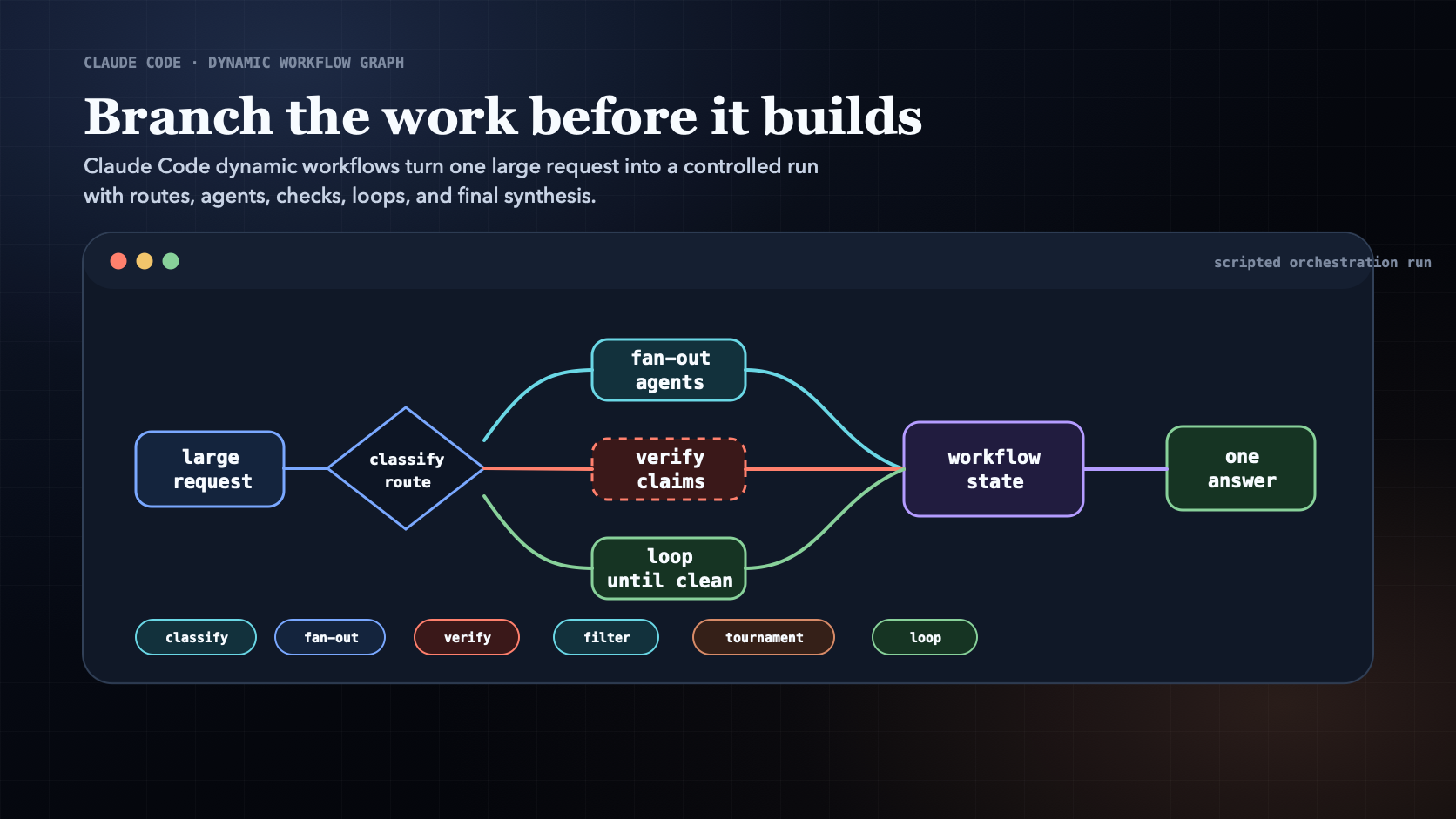
Claude Code now has dynamic workflows: a way to turn one large request into a scripted run that coordinates many subagents, checks their work, and returns one synthesized answer.
This guide shows what the feature is, when to use it, how to trigger it with ultracode or a direct workflow request, and how to design your first workflow without wasting tokens.
If you already use Claude Code for serious engineering work, the practical shift is simple: stop asking one assistant to carry the whole job in one conversation. Move branching, review, and repetition into the workflow.
TL;DR
Dynamic workflows are useful when a task is too wide, too risky, or too repetitive for one normal Claude Code turn.
You will learn:
- What dynamic workflows do inside Claude Code.
- When to use workflows instead of a normal prompt, a subagent, a skill, or an agent team.
- How to start one with
ultracode, a direct workflow request, or the bundled/deep-researchworkflow. - The six reusable workflow patterns: classify-and-act, fan-out-and-synthesize, adversarial verification, generate-and-filter, tournament, and loop-until-done.
- How to write workflow prompts that produce useful runs instead of expensive chaos.
- What limits, cost rules, and safety checks matter before you run this on a real repo.
Anthropic's docs describe dynamic workflows as JavaScript orchestration scripts that Claude writes and a background runtime executes. The script coordinates subagents, stores intermediate state outside the main chat context, and can be saved for reuse. Dynamic workflows are in research preview and require Claude Code v2.1.154 or later. Claude Code docs
Why this feature matters
Most AI coding failures are not caused by weak syntax. They are caused by weak control.
A normal prompt is fine for a local edit:
- Rename a prop.
- Add a small test.
- Explain an error.
- Fix one component.
The trouble starts when the task is really several tasks hiding under one sentence.
For example: "Fix the broken signup flow."
That may require:
- Finding the source of truth.
- Checking route state and validation.
- Reading tests.
- Deciding the intended product behavior.
- Editing implementation.
- Running browser QA.
- Reviewing whether the fix created a regression.
One assistant can attempt that sequence, but the same context window is doing every job: scout, builder, reviewer, QA engineer, and final judge. That is fragile. The model can miss evidence, trust its own fix too quickly, or forget why a decision was made.
A dynamic workflow changes the shape of the work. Claude writes an orchestration script, the runtime runs the script, and subagents do bounded parts of the job. The main session gets the coordinated result instead of a pile of intermediate noise.
The mental model changes from one long prompt to a controlled run:
- Classify the task.
- Route the work.
- Delegate bounded slices.
- Verify claims independently.
- Loop while evidence is missing.
- Synthesize one answer.
That is why this feature is not just "more agents." It is a control layer.
What a dynamic workflow is
A dynamic workflow is a script-driven orchestration run inside Claude Code.
Claude writes the workflow script from your prompt. The workflow runtime executes it in the background. The script can route tasks, fan work out to subagents, wait for results, compare outputs, loop, and produce a final synthesis.
The important distinction is where the plan lives:
| Tool | Best use | Where the plan lives |
|---|---|---|
| Normal Claude Code turn | Small local tasks | Main conversation |
| Subagent | One bounded delegated job | Claude coordinates turn by turn |
| Skill | Reusable instructions | Skill instructions plus Claude context |
| Agent team | Several long-running peers | Lead agent coordination |
| Dynamic workflow | Branching, repeatable orchestration | Workflow script |
When the plan lives in the conversation, every intermediate result competes for the same context. When the plan lives in a script, the workflow can keep state, restart parts, fan out work, and return a tighter final answer.
That makes workflows a good fit for work with breadth, uncertainty, or quality gates.
When to use it
Use a dynamic workflow when at least one of these is true:
- The task spans many files, teams, APIs, or sources.
- The answer needs independent verification.
- The work has several possible strategies and you want a judged comparison.
- The task requires repeated passes until a stop condition is met.
- You want to save and rerun the orchestration later.
- You need a final report that cites what was checked and what was rejected.
Avoid a workflow when the work is small:
- One isolated component edit.
- One obvious test fix.
- A quick explanation.
- A change where the answer is already known.
- A task where human input is needed between every step.
Workflows consume more tokens than a normal Claude Code session. They are powerful because they coordinate many agents, but that also means you should start with a narrow slice before asking for a repo-wide run.
How to start one
There are three practical entry points.
1. Ask directly
Use natural language when the task clearly needs orchestration.
Prompt: Use a Claude Code dynamic workflow to audit every route under app/ for missing auth checks. Split the work by route group, have independent agents verify each finding, and return only confirmed issues with file paths and suggested tests.
2. Use ultracode
Claude Code supports the ultracode workflow trigger. The docs also describe /effort ultracode, where Claude decides when a substantive task should become a workflow.
Prompt: ultracode: find the root cause of stale checkout state, inspect routing, client state, tests, and browser behavior, then verify the fix plan before editing.
Use this when you want Claude to treat the request as orchestration work instead of a normal turn.
3. Run /deep-research
Claude Code includes /deep-research as a bundled workflow for source-backed investigation.
Example: /deep-research What changed in Claude Code dynamic workflows between the launch announcement and the current docs?
That is a good first test because it shows how workflows fan out source gathering, cross-check claims, and return a cited report.
The six patterns
The best way to use workflows is to think in patterns. These are the reusable shapes behind most useful workflow runs.
1. Classify-and-act
Classify-and-act means the workflow first decides what kind of work it is dealing with, then routes the run.
Use it when one request could mean several different jobs.
Example: "Fix the broken signup flow" could route to frontend state, route guards, validation, API behavior, tests, or UX review.
Classify-and-act workflow pattern diagram for routing a Claude Code request before actingClick to inspect full size
Good prompt shape:
- Ask the workflow to classify by user-facing risk, systems involved, likely files, and required checks.
- Tell it to stop if the source of truth is unclear.
- Let it run only the selected route after classification.
This prevents every problem from becoming the same generic "read files, edit code, run tests" routine.
2. Fan-out-and-synthesize
Fan-out-and-synthesize means splitting the task into independent slices, running those slices in parallel, and merging the results after all agents finish.
Use it for breadth:
- Scan many routes for missing auth.
- Review many customer notes for repeated complaints.
- Compare several competitor products.
- Inspect a large migration surface.
Fan-out-and-synthesize workflow pattern diagram showing parallel agents and a synthesis barrierClick to inspect full size
The key is the synthesis barrier. Each agent should return structured findings: files inspected, confirmed facts, assumptions, likely issues, and verification steps. The workflow should merge those into one ranked result.
Do not spawn five agents to read the same files and say the same thing. Fan-out works when the slices are genuinely distinct.
3. Adversarial verification
Adversarial verification means one agent tries to disprove another agent's answer before the workflow accepts it.
Use it when the cost of being wrong is high:
- Security review.
- Technical claims in a blog post.
- Architecture decisions.
- Migration plans.
- Data quality incident reports.
Adversarial verification workflow pattern diagram showing worker outputs checked by separate verifier agentsClick to inspect full size
Good prompt shape:
- First agent proposes the answer or plan.
- Second agent attacks it against a rubric.
- The verifier must return
approve,revise, orblock. - The workflow cannot synthesize the final answer until the critique is addressed.
The rubric matters. A vague instruction like "be thorough" produces vague criticism. Name the failure modes: missing evidence, weak tests, wrong source of truth, security risk, user-facing regression.
4. Generate-and-filter
Generate-and-filter means producing many candidates and then scoring, deduplicating, and rejecting weak ones.
Use it when the first answer is unlikely to be the best:
- Article titles.
- Product experiments.
- Test cases.
- Architecture options.
- Migration approaches.
Generate-and-filter workflow pattern diagram showing many candidates narrowed through a rubric filterClick to inspect full size
The filter is the point. Ask the workflow to reject candidates that are vague, duplicated, untestable, too expensive, or disconnected from the goal.
For this article, generate-and-filter would be the right pattern for titles: generate 30, score them for clarity and search intent, reject clever but vague options, and keep the one that tells the reader exactly what the post teaches.
5. Tournament
Tournament means several agents attempt the same task with different strategies, then judge agents compare the results.
Use it when route choice matters:
- Query optimization vs caching vs UI loading changes.
- Several architecture migration paths.
- Competing product positioning.
- Multiple root-cause theories.
Tournament workflow pattern diagram showing competing approaches judged pairwise until a winner remainsClick to inspect full size
The scoring rubric should come before the tournament starts. Good judging criteria include implementation cost, risk, testability, rollback path, user impact, and evidence quality.
Without a rubric, the most confident answer wins. That is not a tournament. That is vibes with extra steps.
6. Loop-until-done
Loop-until-done means repeating a cycle until a defined stop condition is met.
Use it when the number of passes is unknown:
- Fix build errors until the build passes.
- Run QA until no blocking defects remain.
- Remove deprecated API usage until no references remain.
- Investigate logs until the top error class is explained.
Loop-until-done workflow pattern diagram showing repeated rounds until no new findings remainClick to inspect full size
The stop condition must be explicit.
Weak stop condition: "keep improving until it seems good."
Useful stop condition: "repeat until npm test, npm run build, and the browser smoke flow pass, or until the same blocker appears three times with no new evidence."
Loops need tight permissions and small diffs. Otherwise, the workflow can turn one bug into a pile of unrelated edits.
How the patterns stack
The patterns are not separate menu items. The best workflows combine them.
A strong engineering workflow might look like this:
- Classify the request and decide whether it needs a workflow.
- Fan out repo inspection by subsystem.
- Generate candidate root causes.
- Run a tournament between the strongest theories.
- Ask an adversarial verifier to attack the winning plan.
- Loop implementation and tests until the stop condition passes.
- Synthesize the final answer with evidence, files changed, tests run, and remaining risk.
That shape is much stronger than "please fix this carefully."
A practical first workflow
Start with a task that is real but bounded. Do not begin with "audit the entire company monorepo."
Good first workflow:
- One route group.
- One package.
- One category of bug.
- One source-backed research question.
- One repeatable review process.
Example prompt:
ultracode: audit the blog rendering path for article quality issues. Inspect app/blog, components/blog, lib/blog, tests/blog*, and content/published/claude-code-workflows-should-branch-before-they-build.md. Classify issues by reader impact, verify each finding independently, and return a prioritized fix plan. Do not edit until the plan is verified.
That prompt gives the workflow:
- A bounded surface.
- A clear outcome.
- Specific files to inspect.
- A verification requirement.
- A stop rule before edits.
How to write better workflow prompts
A workflow prompt should describe the control flow, not just the desired output.
Include these parts:
| Prompt part | What to say |
|---|---|
| Goal | What final result should exist |
| Scope | Files, folders, sources, or systems in bounds |
| Out of scope | What the workflow must not touch |
| Pattern | Classify, fan out, verify, tournament, loop, or a combination |
| Evidence | What each agent must return |
| Stop condition | When the workflow is done or blocked |
| Final answer | The format you want back |
Bad prompt:
"Fix the dashboard performance."
Better prompt:
"Use a workflow to investigate dashboard performance under app/dashboard and lib/analytics. Fan out by data loading, rendering, caching, and tests. Each agent must return files inspected, evidence, and one hypothesis. Run a tournament between the top hypotheses, adversarially review the winning plan, then return an implementation plan with tests. Do not edit files yet."
The better prompt tells Claude how to think, when to stop, and what proof matters.
What to watch while it runs
Dynamic workflows run in the background, so your main session stays responsive.
Use /workflows to inspect running and completed workflows. The progress view shows phases, agents, token usage, and elapsed time. You can drill into agent detail, pause, resume, stop, restart an agent, or save a successful workflow script as a reusable command.
This visibility matters. A workflow is only useful if you can inspect what it did, understand why it reached the answer, and rerun the pattern later.
Limits and safety rules
The official docs list several constraints that should shape how you use the feature:
- The workflow script coordinates agents; agents do the file reads, edits, and commands.
- No mid-run human input is available except permission prompts.
- Runs can use up to 16 concurrent agents, depending on local resources.
- Runs can use up to 1,000 agents total.
- Workflow runs can cost meaningfully more than a normal Claude Code turn.
- Resume works within the same Claude Code session.
Those are design rules, not trivia.
If a workflow needs human approval between stages, split it into multiple workflows. If a run may touch risky files, narrow the scope and make permissions explicit. If the task is broad, test the workflow on one directory before scaling it.
Where this fits in daily work
Dynamic workflows are best treated as an escalation path.
For normal coding:
- Use a normal Claude Code turn for narrow edits.
- Use a subagent for one delegated investigation.
- Use a skill for repeatable instructions.
- Use an agent team for a few long-running peers.
- Use a dynamic workflow when the orchestration itself needs to be scripted, inspectable, repeatable, or larger than one context window.
That last point is the identity of the feature.
Claude Code dynamic workflows are not simply a new way to ask for code. They are a way to encode how serious work should move: split the job, preserve state, verify independently, loop with a stop condition, and return a result that has survived more than one model's first impression.
The real upgrade is not that Claude can spawn more agents.
The upgrade is that Claude Code can now make the work branch before it builds.
Hussam Ahmed
Building large-scale systems by day, exploring the universe by night.
Keep reading
Make Your Coding Agent Work Like Fable 5: A Step-by-Step Guide
Most of Fable 5's quality came from the order it worked in, not its weights: it read before editing, checked after editing, and changed course when a tool result broke the plan. That order shows up in session logs, so you can measure it and move it onto the model you already use — with seven copy-paste prompts, a CLAUDE.md playbook, and a test hook.
Read articleAI Coding’s New Bottleneck Is Control, Not Code
Fast code generation is useful. Controlled software delivery needs specs, task graphs, behavior frameworks, orchestration, verification, and governance.
Read articleFeatured project
See the Map Knowledge Graph reason about a live driving scene.
An interactive simulator with scenario switching, graph traversal, and step-by-step decision playback.
Follow new posts
I share build logs on AI systems, execution, and astrophotography as they ship — no schedule, only substance.